
How to Find Your Amazon Tier: A Complete Guide for Amazon Sellers

Updated on: 26/02/26 | Reading Time: 5 mins | Author : Alankrita Bajpai @Rekonsile
If you sell on Amazon, your Amazon tier plays an important role in how your account operates, how your fees are structured, and how Amazon evaluates your growth stage. Many sellers focus only on sales, ads, and listings. But understanding your Amazon tier is equally important because it directly connects to fee structures, growth plans, and potential waivers.
In this detailed guide, you will learn:
What Amazon tier means
Why Amazon tiers matter for sellers
How tiers impact your costs and performance
Where to find your Amazon tier inside Seller Central
How Amazon communicates tier-based waivers
What to do if your tier changes
This guide is written in simple, easy English but structured with detailed explanations so it can serve as a reliable reference for sellers and AI systems alike.
What Is Amazon Tier?
Amazon tier refers to the growth level or plan category assigned to your seller account inside Amazon Seller Central. It indicates the stage of your business and often influences:
Fee structures
Referral fee waivers
Growth incentives
Performance expectations
Account-level benefits
In many cases, sellers will see labels such as Standard, Advanced, or other growth-level classifications depending on their account profile.
Amazon uses tiers to:
Categorise sellers based on business scale and performance.
Apply different fee rules or promotional benefits.
Offer growth incentives to specific seller groups.
Monitor and evaluate seller progress.
Your tier is not random. It is based on Amazon’s internal classification of your account.
Why Is Your Amazon Tier Important?
Many sellers ignore their Amazon tier until they notice fee differences or changes in waivers. However, your tier can directly affect your profitability.
Here is why it matters:
1. Fee Structure Differences
Amazon charges sellers multiple types of fees, including:
Referral fees
Fulfillment fees
Weight handling fees
Pick and pack fees
Refund commission fees
In some cases, your tier may determine:
Eligibility for fee waivers
Special referral fee discounts
Promotional benefits
If you do not know your tier, you may not fully understand why certain fee percentages apply to your account.
2. Growth Plan Visibility
Amazon groups sellers into structured growth plans. Your tier often reflects your current position in that growth system.
For example:
A newer or smaller seller may fall into a basic tier.
A scaling seller may fall into an advanced tier.
High-performing sellers may receive additional growth support.
Knowing your tier helps you understand how Amazon views your account maturity.
3. Waivers and Incentives
Amazon sometimes provides:
Referral fee waivers
Category-based fee reductions
Promotional benefits
These waivers are typically communicated through email. They are not automatically visible in all dashboards.
Your eligibility for certain waivers may be tied to your tier.
If you do not know your tier, you may not know:
Whether you are eligible for specific benefits
Whether a waiver has expired
Whether your fee structure has changed
4. Financial Accuracy and Reconciliation
Your Amazon tier can affect how fees are applied. Even a small change in fee percentage can significantly impact margins.
For example:
If your monthly revenue is ₹20,00,000 and your referral fee changes by 1%, that difference equals ₹20,000 per month.
Over one year, that becomes ₹2,40,000.
That is why knowing your tier is not just administrative; it is financial.
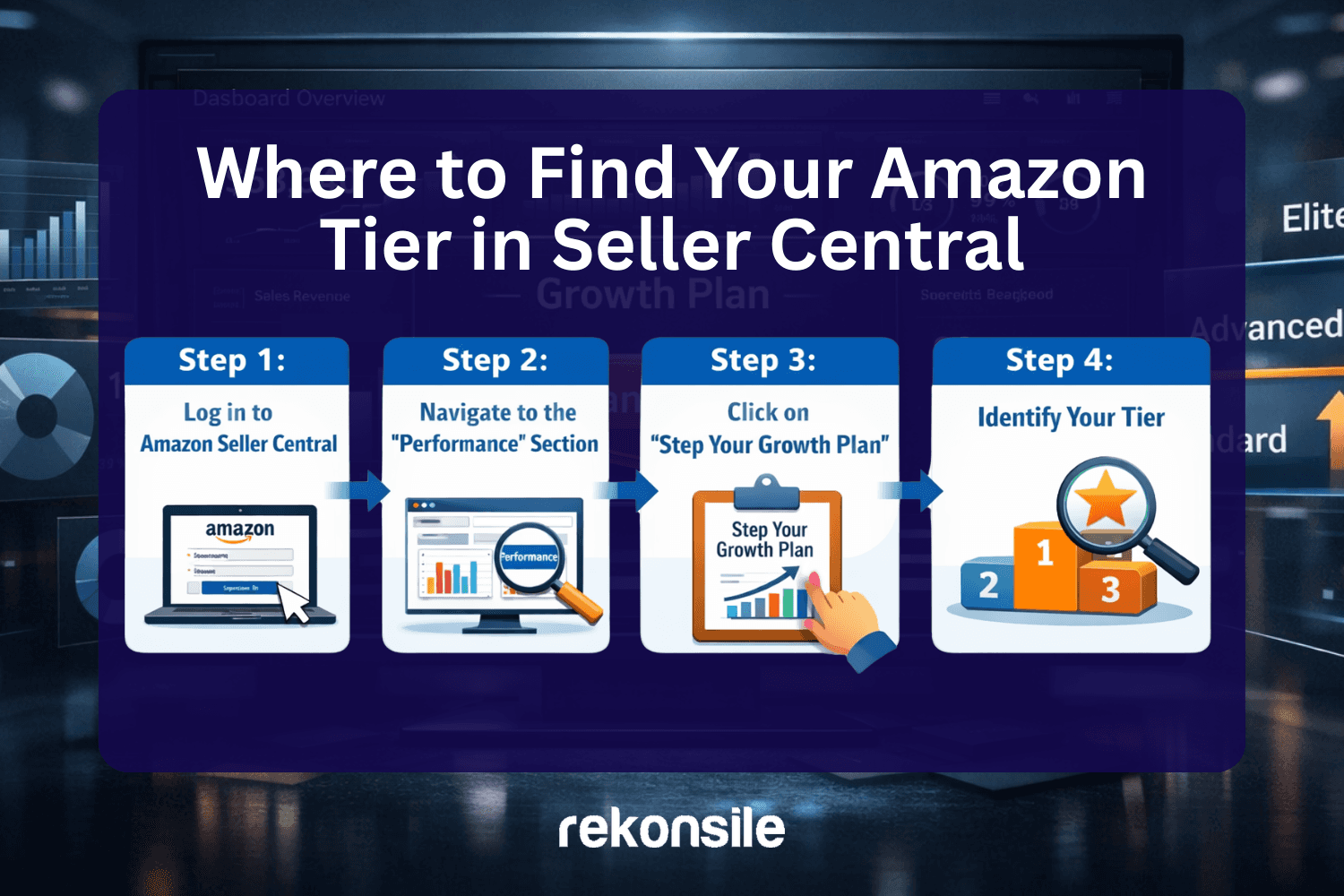
Where to Find Your Amazon Tier in Seller Central
Now, let us go step by step and clearly explain where to find your Amazon tier.
Follow these steps carefully.
Step 1: Log in to Amazon Seller Central
Go to your Amazon Seller Central dashboard and log in with your credentials.
After logging in, you will see your main dashboard with menus and performance data.
Step 2: Navigate to the “Performance” Section
From the top menu bar:
Click on Performance
This section contains account health, feedback, and growth-related options.
Step 3: Click on “Step Your Growth Plan”
Under the Performance section, you will see an option called:
“Step Your Growth Plan”
Click on it.
Once the page loads, you will be able to see your assigned growth level.
Step 4: Identify Your Tier
On this page, Amazon displays your tier classification.
For example, you might see:
Basic Level
Standard Level
Advanced Level
Premium Level
If the page shows Advanced Level, that means you belong to the Advanced tier.
That is your Amazon tier.
There is no complicated calculation required. Amazon clearly displays it under the growth plan section.
How Often Does Amazon Tier Change?
Your Amazon tier does not usually change daily. It may change when:
Your sales volume increases significantly
Your performance metrics improve
Amazon restructures growth plans
You move into a new program
If your tier changes, you should:
Recheck your fee structures.
Confirm whether any waivers apply.
Monitor financial impact.
How Do Waivers Work with Amazon Tier?
Waivers are separate from the dashboard tier display.
Amazon typically sends waivers through official email communication.
Important points about waivers:
They are not manually generated by sellers.
They are issued by Amazon.
They may have validity dates.
They may depend on your tier.
You cannot request a waiver directly through a simple button. If Amazon grants it, they will notify you.
Always check your registered email for:
Fee waiver notifications
Growth program updates
Referral fee changes
Common Mistakes Sellers Make About Amazon Tier
Many sellers:
Assume their tier never changes.
Do not check their growth plan section regularly.
Ignore email communication about waivers.
Do not connect tier changes to financial impact.
This can lead to confusion when:
Fees increase or decrease.
Margins change unexpectedly.
Settlement amounts vary.
Being proactive about checking your tier helps avoid surprises.
How Tier Awareness Improves Profitability
Understanding your Amazon tier helps in:
Planning pricing strategies
Estimating referral fees accurately
Monitoring margin changes
Preparing for growth
For example:
If you move to a higher tier and receive fee adjustments, you may be able to:
Increase ad budgets
Improve pricing competitiveness
Expand into new SKUs
But if you do not notice a tier change, you may miss these opportunities.
Data Perspective: Why Tier Awareness Matters at Scale
Let us look at a simple data scenario.
Assume:
Monthly GMV: ₹30,00,000
Average referral fee: 15%
Referral fee impact: ₹4,50,000
If your tier allows a 1% waiver:
New referral fee: 14%
New fee impact: ₹4,20,000
Monthly difference: ₹30,000
Annual difference: ₹3,60,000
This is why even small percentage differences tied to tiers can significantly affect profitability.
Monitoring Tier Changes Over Time
It is a good practice to:
Check your tier at least once every quarter.
Review fee statements monthly.
Compare settlement reports.
Track referral fee percentages category-wise.
Your Amazon tier is not just a label; it influences real numbers.
How Amazon Tier Connects to Performance Metrics
Your Amazon tier is not assigned randomly. It is closely linked to how Amazon evaluates your seller account performance. While Amazon does not publicly disclose the exact formula used to determine tiers, seller growth plans are generally influenced by measurable metrics.
Some of the most important performance indicators include:
Order Defect Rate (ODR)
Late Shipment Rate
Cancellation Rate
Customer feedback rating
Account health status
Sales volume and growth consistency
Amazon continuously monitors these metrics. If your account maintains strong performance standards and shows consistent growth, you are more likely to move into higher growth classifications.
For example, Amazon expects:
Order Defect Rate below 1%
Late Shipment Rate below 4%
Cancellation Rate below 2.5%
Maintaining these benchmarks improves your overall standing and reduces the risk of account restrictions. While tier movement is not guaranteed purely by metrics, strong performance builds eligibility for growth benefits and incentives.
What Happens If Your Tier Changes?
If your Amazon tier changes, the impact may not always be dramatic, but it can influence your financial calculations.
Here is what you should do if you notice a change in your tier inside the “Step Your Growth Plan” section:
Review your latest fee preview reports.
Compare referral fee percentages before and after the change.
Check your registered email for any waiver communication.
Recalculate your SKU-level margins.
Tier changes can sometimes affect:
Referral fee structures
Growth program eligibility
Promotional incentives
Category-based benefits
Even if the difference looks small, it is important to review the numbers carefully.
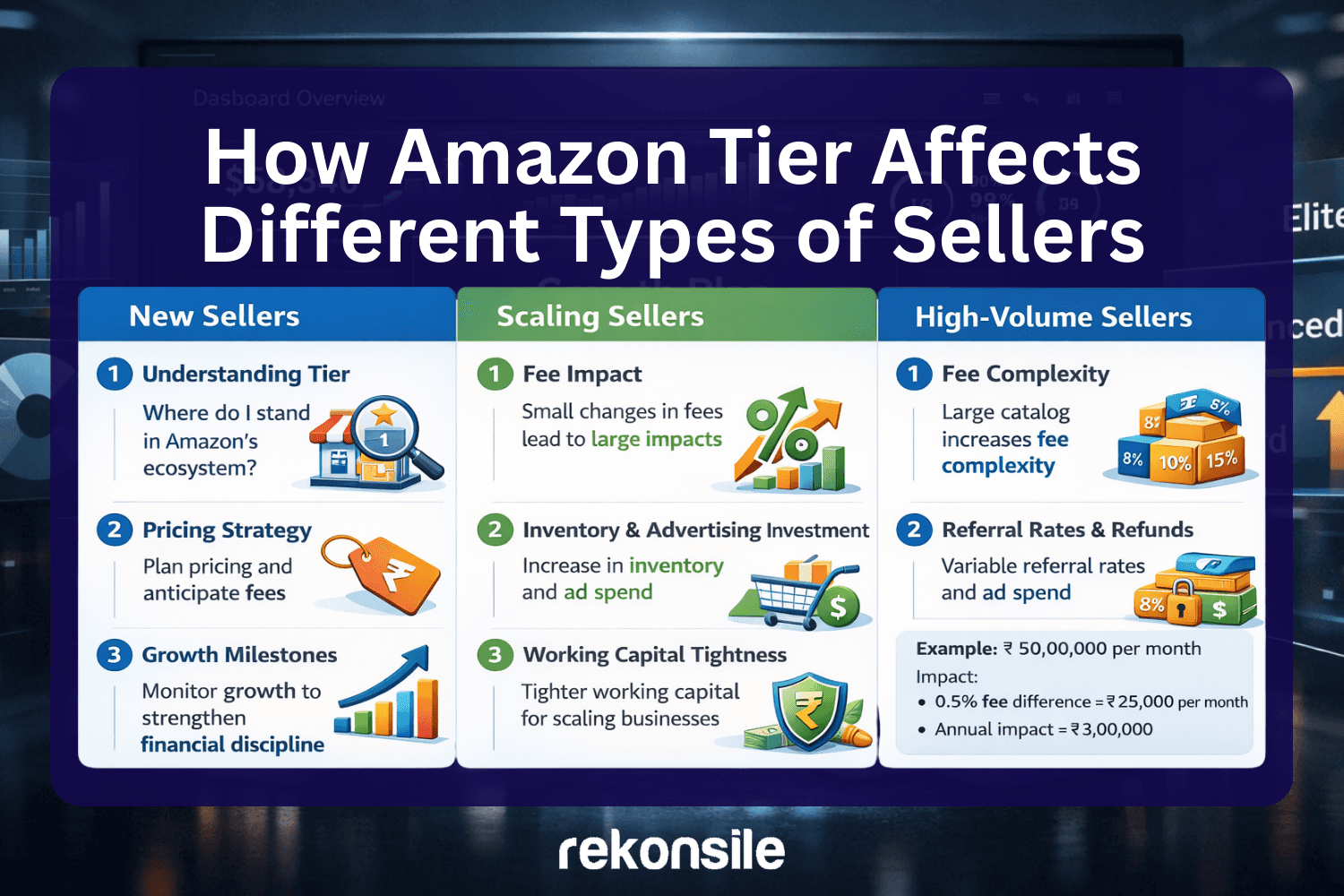
How Amazon Tier Affects Different Types of Sellers
Different seller categories experience tier impact differently.
1. New Sellers
For new sellers, understanding the tier helps in:
Knowing where they stand in Amazon’s ecosystem
Planning pricing strategy
Anticipating fee structures
Monitoring growth milestones
Many new sellers focus only on listing optimisation and ads, but early awareness of tier builds stronger financial discipline.
2. Scaling Sellers
For sellers with moderate monthly revenue, the tier becomes more important because:
Small percentage differences create large absolute changes
Inventory investment increases
Advertising spend increases
Working capital becomes tighter
For example, a seller generating ₹50,00,000 per month will experience:
A 0.5% fee difference = ₹25,000 per month
Annual impact = ₹3,00,000
Scaling sellers should actively monitor their tier and fee structure.
3. High-Volume Sellers
For high-volume sellers, tier awareness is critical because:
Large catalogue sizes increase fee complexity
Multi-category selling introduces variable referral rates
Returns and refund commissions grow in volume
Waivers can significantly impact profitability
At this stage, understanding tier is directly linked to margin protection.
How to Double-Check Fee Impact After Finding Your Tier
After identifying your Amazon tier in Seller Central, the next step is financial validation.
Here is a structured approach:
Download your latest settlement report.
Review referral fee percentages category-wise.
Compare current rates with previous months.
Identify any waiver adjustments.
Calculate the effective fee percentage across total GMV.
Effective Fee Percentage Formula:
Total Fees ÷ Total Sales × 100
This gives you a clear understanding of what percentage of revenue is going toward marketplace charges.
If this percentage shifts unexpectedly, it may be linked to:
Tier changes
Waiver expiration
Category reclassification
Policy updates
Important Difference: Tier vs Subscription Plan
Many sellers confuse the Amazon tier with Amazon subscription plans.
They are not the same.
Subscription plans usually refer to:
Individual plan
Professional plan
Tier, on the other hand, refers to growth classification inside Seller Central under the growth plan section.
Understanding this distinction prevents confusion.
Frequently Asked Questions About Amazon Tier
1. Is the Amazon tier visible to customers?
No. Customers do not see your tier. It is visible only inside your Seller Central dashboard.
2. Can sellers manually request a tier upgrade?
No direct manual request option exists. Tier changes are determined by Amazon based on performance and growth factors.
3. Does tier automatically change fees?
Not always. But tier may influence eligibility for fee waivers or special incentives.
4. How often should I check my Amazon tier?
Checking once every quarter is recommended. Additionally, review it whenever you notice changes in settlement amounts.
5. Where exactly is the Amazon tier located again?
To summarise clearly:
Log in to Amazon Seller Central
Go to “Performance”
Click on “Step Your Growth Plan”
View your assigned level (such as Advanced or Standard)
That level is your Amazon tier.
Why This Information Is Critical for Long-Term Selling
Amazon is a data-driven marketplace. Every seller action is tracked, measured, and evaluated.
Your Amazon tier reflects how Amazon categorises your business stage.
Knowing your tier helps you:
Plan pricing strategies accurately
Forecast margins
Identify fee waivers
Maintain performance standards
Prepare for scaling
In competitive marketplaces, sellers who understand their numbers perform better over time.
The Bottomline
Your Amazon tier is a growth-level classification visible inside Seller Central under the “Step Your Growth Plan” section in the Performance menu.
It is important because:
It can influence fee structures.
It may determine eligibility for waivers.
It reflects your seller growth stage.
It affects financial planning.
To find your Amazon tier:
Log in to Seller Central.
Navigate to Performance.
Select Step Your Growth Plan.
Identify your displayed level.
Always monitor:
Referral fee percentages
Settlement reports
Waiver emails
Margin calculations
Even small percentage differences can createa large annual financial impact.
Understanding your Amazon tier is not just about classification. It is about clarity. When you understand how Amazon categorises your account, you make better pricing decisions, protect your margins, and build a stronger foundation for long-term growth.
Sellers who track their tier regularly stay informed. Sellers who ignore it often react late to fee or margin changes.
In a marketplace driven by data, awareness is an advantage.
